Habits
How to stop opening apps on autopilot
To stop opening apps on autopilot, remove the cue and add a few seconds of effort before the app can open. The open is usually a checking habit: a brief look for something that might have changed, reinforced because the reward shows up instantly. Willpower after the icon is on screen is late. Hide the app, or put a short challenge in front of it, and leave it installed for the times you actually mean to use it.
What the open actually is
You unlock the phone to check the time, or the weather, or whether a message arrived. A moment later you are in an app you did not come for, and the original reason is gone. That sequence is ordinary, and it has a name in the research. In a 2011 paper, Antti Oulasvirta and colleagues called it a checking habit: brief, repetitive inspection of dynamic content that is quickly accessible on the device. Across the studies they describe, those checks sometimes spilled into other uses and lined up with more use overall. The reward that trained the habit was information arriving fast. People in their interviews experienced the repetition more as an annoyance than as an addiction.
That last finding matters for how you set up a phone. If the feeling is “this is annoying and I keep doing it,” you need a change to the path, not a diagnosis. A later field study, published in Scientific Reports in 2025, followed 419 people and found that stronger app habits predicted both a higher chance of using the app and more use when it was used, especially in places and on routes people already traveled out of habit. The apps with the strongest habits also showed up across more contexts. The practical reading: the open is tied to cues, including the phone itself and the places you are when you hold it, and a strong habit needs less of a special occasion to fire.
We are not clinicians, and this guide is not a treatment. The boundary is in our disclaimer. What we can do, as the people who build a launcher, is change how reachable the cue is and how many seconds stand between the reach and the feed.
Take the cue off the first screen
A colored icon on the home screen is a cue you see every time you check the clock. Moving that icon into a folder labeled “later” keeps the color and adds one tap. The habit is happy to pay one tap. Taking it off the home screen entirely is the first real change.
In ReClaim the first page is a clock, the few apps you chose to keep close, and two corner shortcuts that start as Phone and Photos. Everything else is one swipe away, on a list of names. The list has no icons. We removed them because a glyph in brand colors is an advertisement you did not ask to see while looking up Calendar. Search is there for the name you already have in mind. A folder you created sits above the alphabet, so the things you grouped on purpose stay findable. The setup is the whole of how to set up a minimal Android home screen.
If the app is still on that first page because you “might need it,” it is still a cue. Need is what the second page and search are for. The first page is for intention.
Three levels of friction
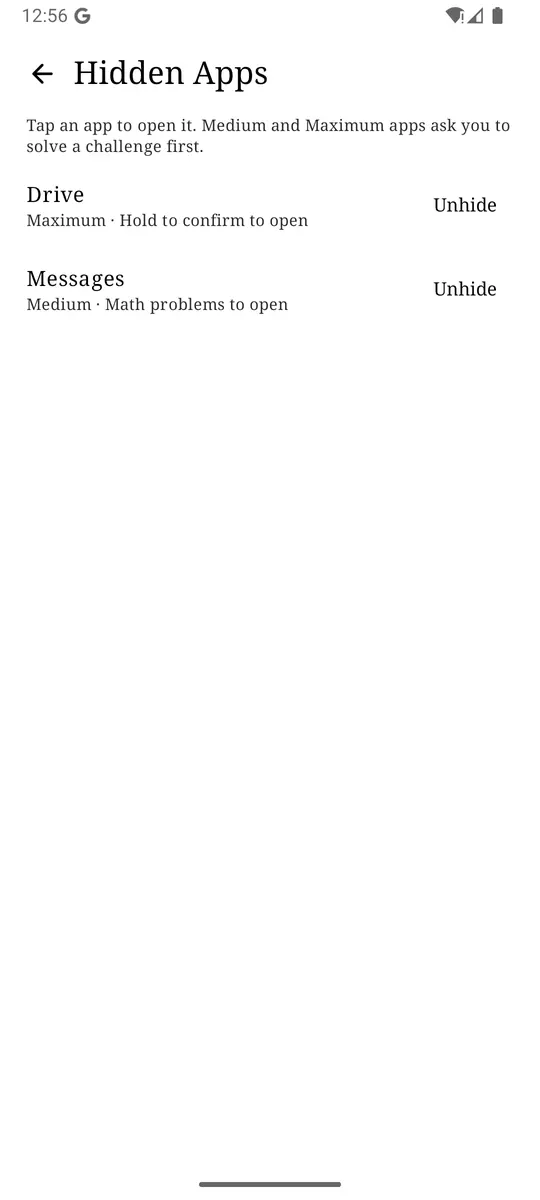
Once the icon is off the home screen, you can still open the app from the list, in one tap, with no thought. That is the right behavior for Calendar. It is the wrong behavior for the app your thumb finds by itself. Hidden Apps, under Settings, then More, is the dial for that difference. The screen tells you what you are choosing: tap an app to open it, and Medium and Maximum apps ask you to solve a challenge first.
The three levels, in the words the picker uses:
- Simple. “Hidden from the launcher.” The app leaves the list. Opening it means going to Hidden Apps on purpose. There is no puzzle. This is for an app you will not delete and do not want as a billboard: a store you use monthly, a game you are between seasons on, a work tool that stresses you out at 10 p.m. If you know the Hidden Apps screen exists, Simple will not stop a determined open. It stops the accidental one.
- Medium. “Solve a quick challenge to open.” Aimed at muscle memory. The open still happens, after a small deliberate act, so a real reason gets through and a drift often does not.
- Maximum. “Solve a harder challenge to open.” For the loop where a moment of hesitation is not enough. The defaults are slow on purpose.
Which challenge to pick
Medium and Maximum each ask you to choose the kind of speed bump. The descriptions below are the defaults the picker shows. You can edit the knobs afterward: how many math problems, whether the numbers get harder, how many seconds the hold lasts (from 1 to 600), how long a memory sequence is, how exact the phrase is. The defaults are the place to start, because they were picked to match the level rather than to impress anyone.
| Challenge | Medium default | Maximum default |
|---|---|---|
| Math problems | 1 quick problem | 3 harder problems in a row |
| Type a phrase | Type a short phrase exactly | Type a longer, punctuated sentence exactly |
| Memory sequence | Memorize and repeat a 4-step sequence | Memorize and repeat a 6-step sequence |
| Hold to confirm | Hold a button for 10 seconds | Hold a button for 2 minutes. Letting go starts the timer over. |
| Reason for opening | Write a reason, any length | Write at least 10 words about why |
| Multiple confirmations | Not offered | Four different confirmations in a row |
Pick the challenge that breaks your particular autopilot.
- Math or a typed phrase if your hand opens the app while your attention is elsewhere. Both require a correct answer, so you cannot satisfy them by mashing. A single easy sum is enough to mark the moment. It is small on purpose. The point is the interruption, and a puzzle you resent will get turned off.
- Memory sequence if you are good at doing a familiar tap pattern without looking. A new sequence is not stored in the thumb yet.
- Hold if the problem is speed. Ten seconds is long enough to notice you are waiting for an app. Two minutes is long enough that you will only pay it when you mean it. Releasing early restarts the hold, so a fidget does not count.
- A written reason if you want the open to produce a sentence. “Boredom” is a valid sentence. Seeing it, in your own words, is the mechanism. Maximum asks for at least ten words, which is long enough that a shrug has to become a reason.
- Four confirmations only at Maximum, for the app where you have blown through every quicker gate and you still want it installed.
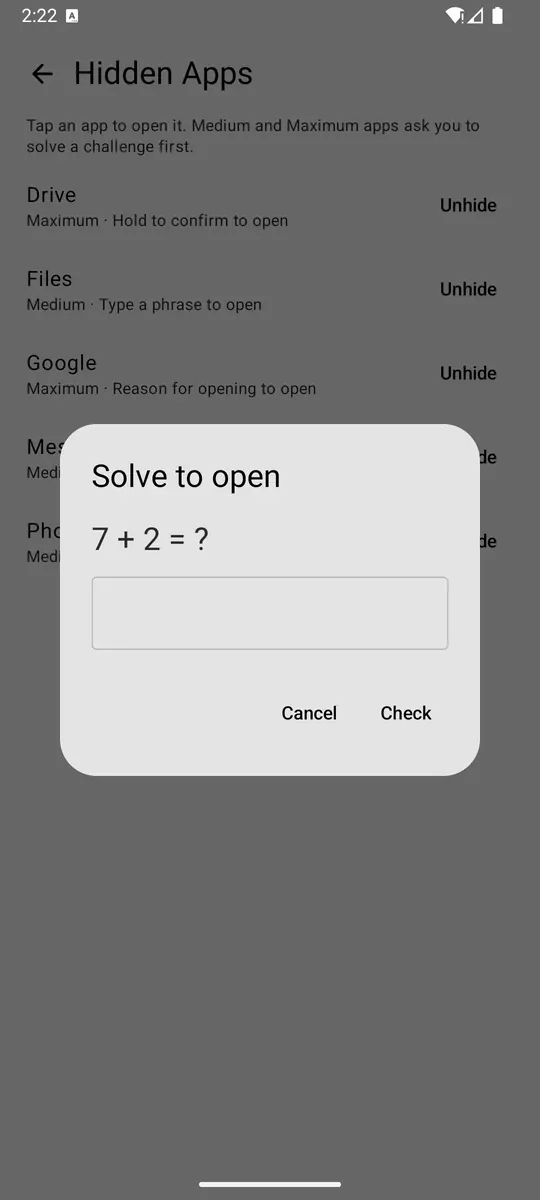
A challenge you can solve while half asleep will get solved while half asleep. If you notice yourself completing Medium the way you used to tap the icon, the level is now part of the habit. Move it to Maximum, or change the challenge type so the old answer stops working. The gates are editable because habits learn.
One app, one level, one week
Hiding twelve apps on a Sunday night produces a phone you fight with on Monday, and the usual ending is turning the whole feature off. Change one app.
- Name the app you open and then regret. One. If there are five, pick the one that starts the chain. The second app in the chain is a candidate for blocking together later, not for today’s experiment.
- Take it off the home screen if it is sitting there. Do this even if you also hide it. A cue you can see will keep asking.
- Hide it at Medium with the challenge that matches the list above. Use Simple only if the problem is “I see it and wander in,” and you trust yourself once it is out of the list. Use Maximum only if Medium has already failed you on this specific app.
- Leave it for seven days. Count two things, on paper or not at all: how often you completed the challenge, and how often you backed out. Backing out is the feature working. Completing it every time, instantly, means the gate is too familiar.
- On day seven, change one variable. A harder level, a different challenge, or a real block during the hours the opens cluster. Then stop tuning. A setup you edit every morning is another thing to check.
If you never go looking for the hidden app, Simple would have been enough, and you can drop the challenge. Friction you do not need is just annoyance, and annoyance is how features get disabled.
When hiding is the wrong tool
Hiding assumes you may still open the app, after a beat. That is the wrong assumption in three common cases.
The hours are the problem. You are fine with the app at lunch and you do not want it in bed or during a work block. A schedule blocks it on those days and between those times, and turning the schedule off lifts it. A challenge at midnight is a challenge you will sit through. A block during those hours does not offer the sitting.
The total is the problem. You open it on purpose and then lose forty minutes. A challenge at the door does its job and then gets out of the way, which is how the forty minutes happen. Put a daily limit on it, with the action set to block for the rest of the period, or a reminder that asks for a number of minutes before the open. The reminder’s settings will suggest a standing limit if you keep extending.
You are done until a date. Hide is a speed bump on a road that is still open. A block until a duration ends is the closed road. There is no early unlock on a manual block. Choose it when you want that, and choose a limit when you do not.
Hiding also does nothing about notifications that deep-link into the app. If the banner itself is the cue, turn notifications off for that app in Android settings, or the challenge never gets a chance to run because you entered through the shade. System-wide blocking matters here too, for apps you have actually blocked: it is what closes an open that started outside the launcher. The cases where enforcement looks like it “stopped” are almost always that service, or battery optimization, and they are written up on the support page.
What we refused to add
A streak for “days since you opened it” would pull you back into the phone to protect the streak. A badge for completing challenges would do the same. We cut that whole family of ideas. The question we use is whether a feature makes intentional use easier or makes the phone more interesting to pick up. A counter you have to visit fails the question. The extension count on a reminder (“Extended 2× today”) stays, because it appears at the moment you are already negotiating, and it is a fact about this opening rather than a score to maintain. More of that reasoning is on our approach.
The same restraint applies to how hard Maximum should be. A two-minute hold is uncomfortable. It is supposed to be, for an app you asked us to make uncomfortable. It is a bad default for every app, which is why it sits behind an explicit Maximum choice and why you can shorten the hold if two minutes was theater. Friction you did not choose, you will route around. Friction you chose for one app, you will usually respect for a while. “A while” is the honest horizon. Recheck at the end of the week using the two counts above, and change the level if the behavior changed.
You can still open the app. That is the design. The aim is an open you remember choosing, with the app still there for the time the choice is real. If what you wanted was to be incapable of opening it, say so with a block, and read the limits of what a launcher can enforce before you rely on it for anything safety-critical. Those limits are in the disclaimer, and the permissions behind enforcement are on requirements.
Home screen: clock, and only apps you would be glad to have opened. One problem app: off that screen, hidden at Medium, math or a ten-second hold. The hours you already know are dangerous: a schedule, not a challenge. Recheck in seven days. Change one thing.
Questions
Does hiding an app delete it?
Hiding in ReClaim changes whether the app appears in the launcher and what you have to do before it opens. The app and its data stay installed.
What is the difference between Simple, Medium, and Maximum hide?
Simple removes the app from the launcher and adds no challenge. Medium asks for a quick challenge, such as one math problem, typing a short phrase, a 4-step memory sequence, holding a button for 10 seconds, or writing a reason. Maximum asks for a harder version: three harder math problems, a longer phrase, a 6-step sequence, a 2-minute hold, a 10-word reason, or four confirmations in a row.
I still open the app after the challenge. What now?
If you complete Medium without really noticing, move that app to Maximum or put a block on it for the hours when the opens happen. A challenge is a speed bump. A block is a closed road until a time you set.
Is this a treatment for phone addiction?
ReClaim is a launcher, not a medical or mental-health service. Checking habits are common and often feel like an annoyance. If your use is causing serious harm, talk to a qualified professional. See the disclaimer.