Minimalist Android launcher
Make distraction intentional.
ReClaim is a home screen built around one question: does this make it easier to use your phone on purpose, or easier to lose an hour to it? Productive apps stay one tap away. Everything else gets a little harder to reach, on purpose.
The problem
Your phone isn't the problem. The friction is backwards.
Every distracting app on your phone was built to be one frictionless tap away, and every genuinely useful one gets buried in a folder. ReClaim flips that. It doesn't ask for willpower. It just changes which actions are easy and which ones require a moment of intention first.
Read our approach →What's inside
Six ways ReClaim keeps you in control of your phone, not the other way around
App blocking
Pick an app, pick a duration from 5 minutes to a year, and it's gone until the timer runs out. ReClaim even suggests what else you'll probably want to block alongside it.
Daily & weekly limits
Give an app 20 minutes a day. When it's up, ReClaim closes it automatically, no lingering, no "five more minutes." Raise the limit and the block lifts the moment you do.
App reminders
Not every app needs a hard wall. Reminders ask "how long do you intend to use this?" before you open it, then nudge you when that time's up, a check-in, not a lockout.
Scheduled blocking
Work hours, bedtime, weekends, set up recurring windows where specific apps simply aren't available. No daily decision required, no willpower spent.
Hidden apps, four levels
Some apps you don't want to delete, just stop opening on autopilot. Hide them behind nothing, a quick puzzle, a harder one, or a challenge that needs your eyes on the screen.
A genuinely calm home screen
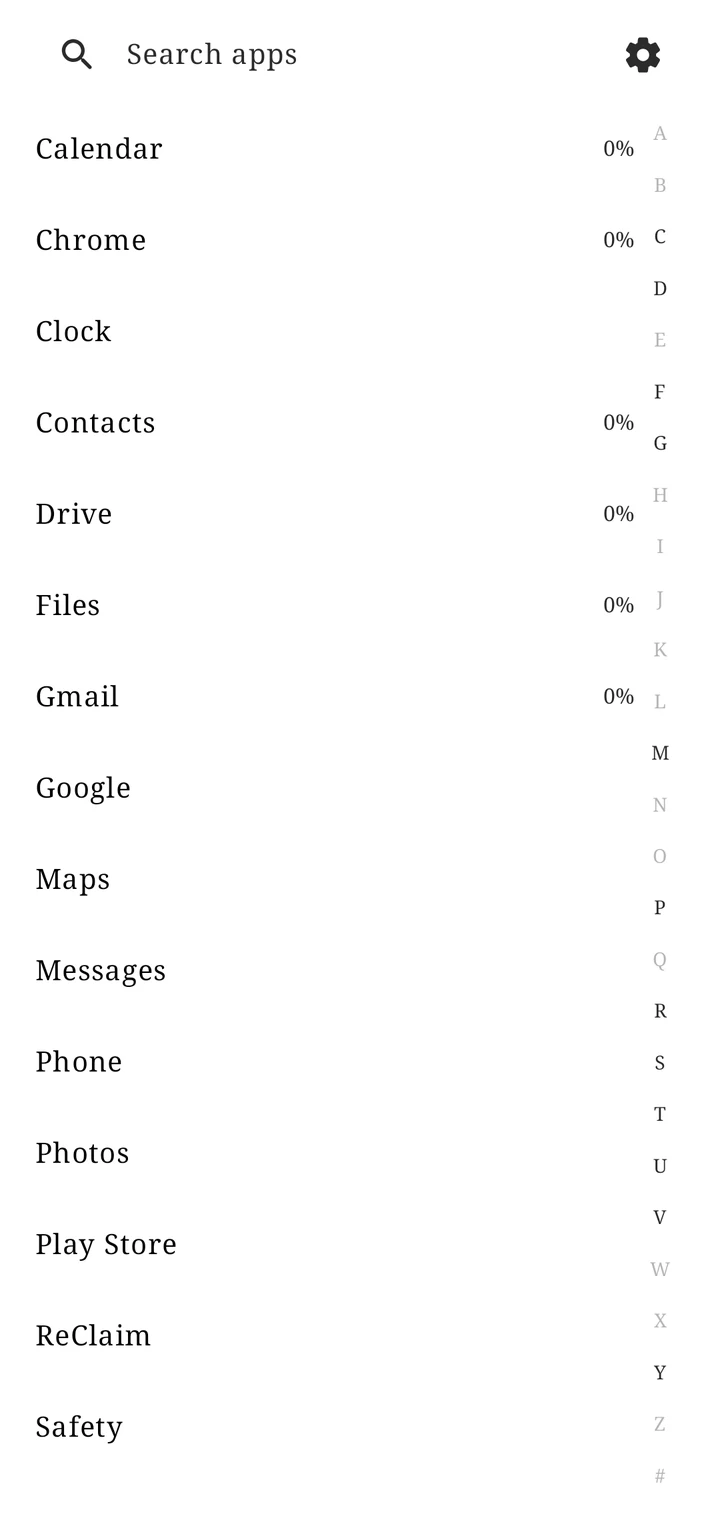
A clock, your actual favorites, nothing else. Swipe right for a plain alphabetical list, black text, no icons, no visual bait, just what you're looking for.
How it works
Set up once. Let the friction do the work.
ReClaim replaces your home screen, that's what makes it work system-wide instead of being one more app you have to remember to open.
Set ReClaim as your home app
One toggle in Android settings. Everything else about your phone stays exactly the same, this only replaces the launcher.
Choose what deserves a shortcut
Add the handful of apps you actually mean to use to your home screen. Everything else lives one swipe away, in a plain list, reachable, never dangled in front of you.
Add friction to the rest
Block the apps you already know you overuse. Set a daily limit on the ones you just want to rein in. Hide the ones you open out of habit rather than intention.
ReClaim enforces it automatically
Limits reset on their own. Blocks lift on their own. Scheduled windows run in the background. You set the rule once, ReClaim holds the line after that.
"Does this make it easier for someone to intentionally use their phone, or does it encourage spending more time on it?"The question behind every feature we build
Blog
Guides for a phone you meant to pick up
Long, practical notes on a quiet home screen, blocking an app without deleting it, and which kind of friction fits.
Set up a minimal Android home screen
A clock, a few apps you mean to open, and a plain list for everything else.
BlockingBlock apps without uninstalling them
Built-in timers, Focus mode, and a duration that runs until the time you set.
Choose a toolLimits, blocking, or reminders
A block expires on its own. A limit can be raised. A reminder asks first.
HabitsStop opening apps on autopilot
Take the cue off the first page, then match the friction to the habit.
Questions
A few things people ask first
Is ReClaim free?
Yes. ReClaim has no ads and doesn't require an account to use. Optional account sign-in (for future cloud backup and settings sync) will always be optional, never a requirement to use the launcher.
Can I still use my regular apps normally?
Completely. ReClaim only replaces your home screen and app drawer, it doesn't change how any other app works. Anything you haven't chosen to block, limit, or hide opens exactly like it always has.
What if I need a blocked app in an emergency?
Blocks are time-based, not permanent, and you're always the one who set the duration. Phone and emergency-relevant apps are never blocked by default.
Get started
ReClaim is out now on Android.
Free on Google Play, with no ads and no account. Works on Android 8.0 and newer, and you can switch back to your old home screen any time.

Google Play and the Google Play logo are trademarks of Google LLC.